Cross-platform workforce management solution for healthcare organizations
SafeCare Live is a workforce management platform that helps healthcare organizations optimize staffing by providing real-time visibility into patient demand, workforce capacity, and clinical risk across hospital departments.
.png)
Position
Sr. Product Designer
Timeline
April 2024 - July 2026
Team
4 Developers, 1 PO, 2 QA Engeneers, 1PM
Core Responsibilities
- Led the UX/UI redesign across desktop, tablet, and mobile.
- Designed intuitive workflows for healthcare professionals.
- Created wireframes, prototypes, and high-fidelity designs.
- Collaborated closely with Product Managers and engineers.
- Contributed to the complete product rebrand.
- AI-assisted design & front-end implementation using Figma AI, Cursor and Claude Code.
- Improved accessibility and usability across the platform.
My role
I was responsible for designing end-to-end user experiences across desktop, tablet, and mobile, contributing to the complete product redesign and rebrand. My work covered research, UX, UI, prototyping, and implementation, ensuring a seamless experience across every platform.
Key Achievements
- Successfully delivered a complete cross-platform product rebrand.
- Validated design decisions through user research and usability testing.
- Received positive feedback from clinical users on the redesigned experience.
- Improved usability and navigation across key product workflows.
- Delivered a more consistent and accessible experience across all platforms.
Project Background
SafeCare Live is a healthcare workforce management platform used by hospitals to monitor staffing levels, patient demand, and clinical risk in real time. It helps ward managers and clinical teams make informed staffing decisions while maintaining safe levels of patient care.
Objectives
- Modernize the SafeCare Live experience through a complete redesign.
- Introduce new features and improve existing workflows.
- Design responsive experiences for desktop, tablet, and mobile.
- Improve usability, accessibility, and overall product consistency.
The Challenge
SafeCare was an established product used by healthcare teams for years. The challenge was to redesign the UX and UI from the ground up while keeping the experience familiar for existing users and avoiding disruption to their established workflows.
We started by reviewing feedback from existing users to understand the main pain points in the current experience. I then took part in user interviews and usability testing, using those insights to identify where workflows could be simplified and which familiar patterns needed to remain.
The Solution
We approached the redesign by improving the existing experience rather than changing familiar workflows completely. Feedback and research helped us identify where users were experiencing friction, but also which parts of the product they already knew and relied on.
Research also showed us how important tablet and mobile usage was in the day-to-day work of healthcare teams. This influenced us to take a mobile-first approach and think about the experience across different screen sizes from the beginning, rather than adapting the desktop experience later.
From there, I focused on simplifying key workflows, reducing unnecessary steps, and introducing more consistent interaction patterns across desktop, tablet, and mobile.

Modernizing without losing familiarity
As part of the redesign, I worked on many different features and workflows across SafeCare. One of the improvements focused on how users accessed detailed information and actions across the product. For hospital staffing teams, it was important to see the information they needed without losing the context of what they were currently working on.
In the original experience, opening more details often took users to a separate screen. This meant moving back and forth between different parts of the application and made some workflows harder to follow. The Unit View below is one example of this.
After discussing the problem with the product team and exploring different ideas, we decided to use side panels as a consistent way to show this type of information across the product.
Instead of taking users to separate screens, the side panel allowed them to see the information and take actions while staying on the Unit View.
We also created a consistent structure for the panels and reused components from our design system, so the same patterns and components could be used across different parts of SafeCare.
We tested the new approach with users during usability testing. The feedback was positive and confirmed that users could find the information they needed and complete their tasks without losing context. After that, we started using the same pattern across other parts of SafeCare.

Improving workflows across the product
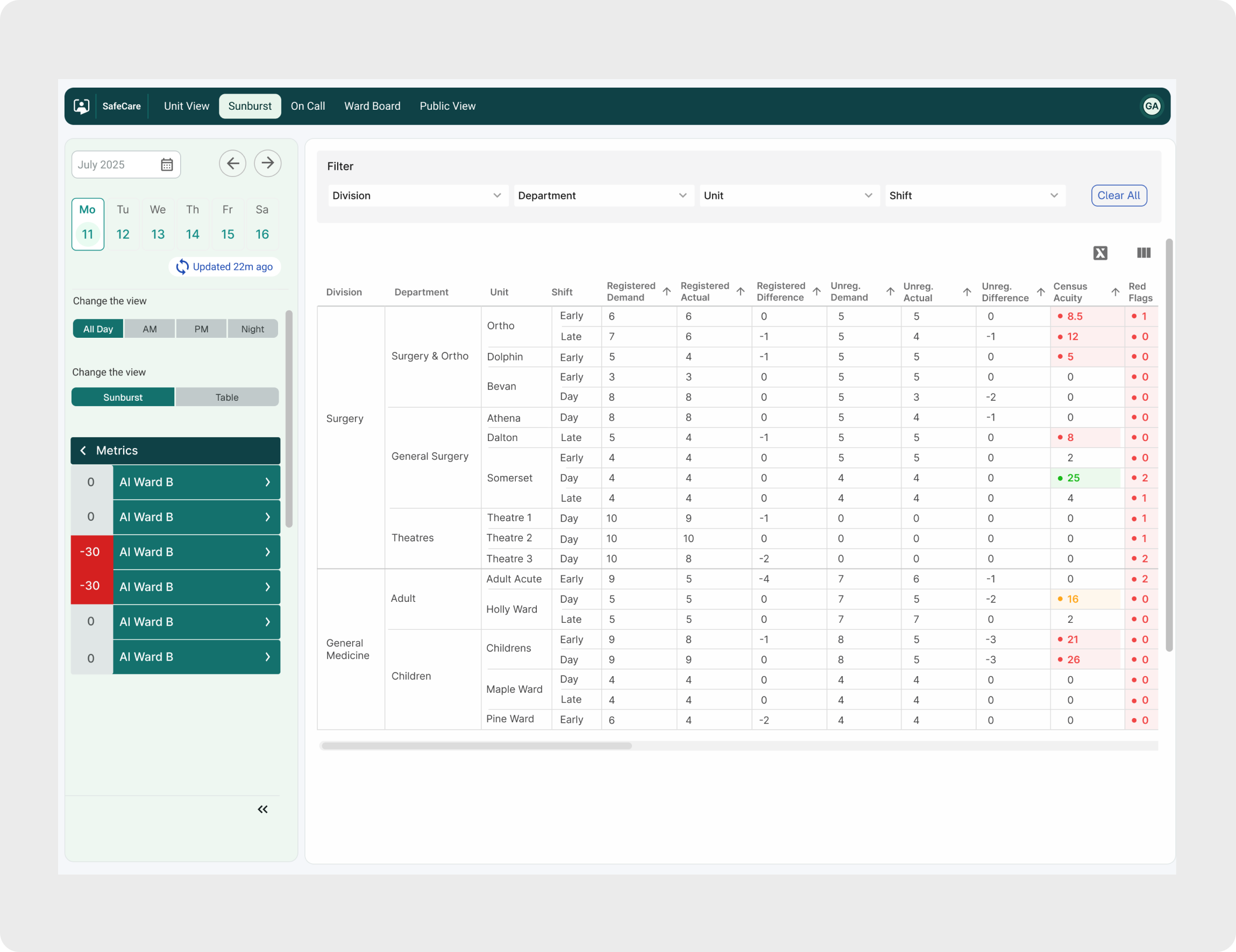
The side panels were only one part of the redesign. I worked on many other features and workflows across SafeCare, from improving existing functionality to designing new features for desktop, tablet and mobile.
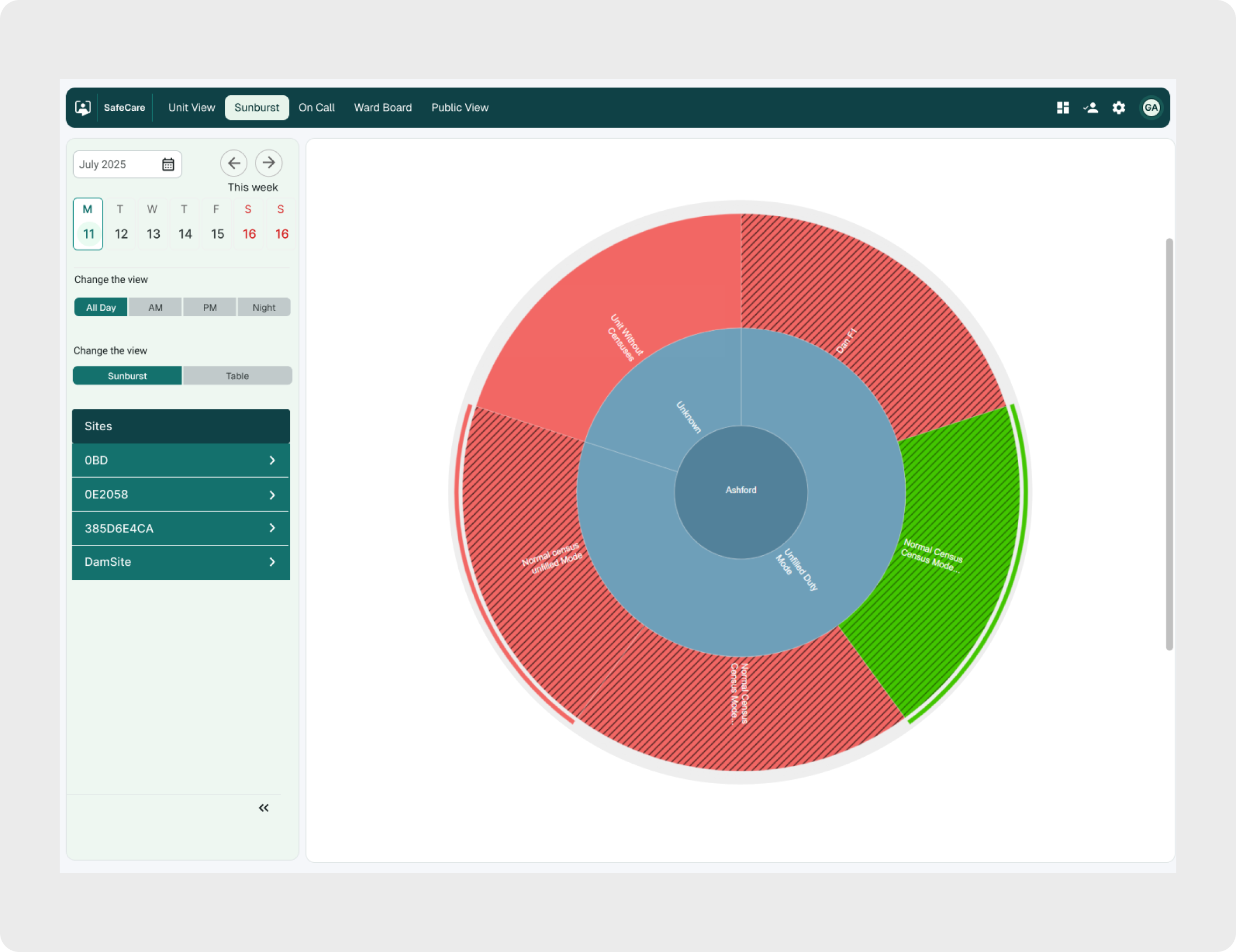
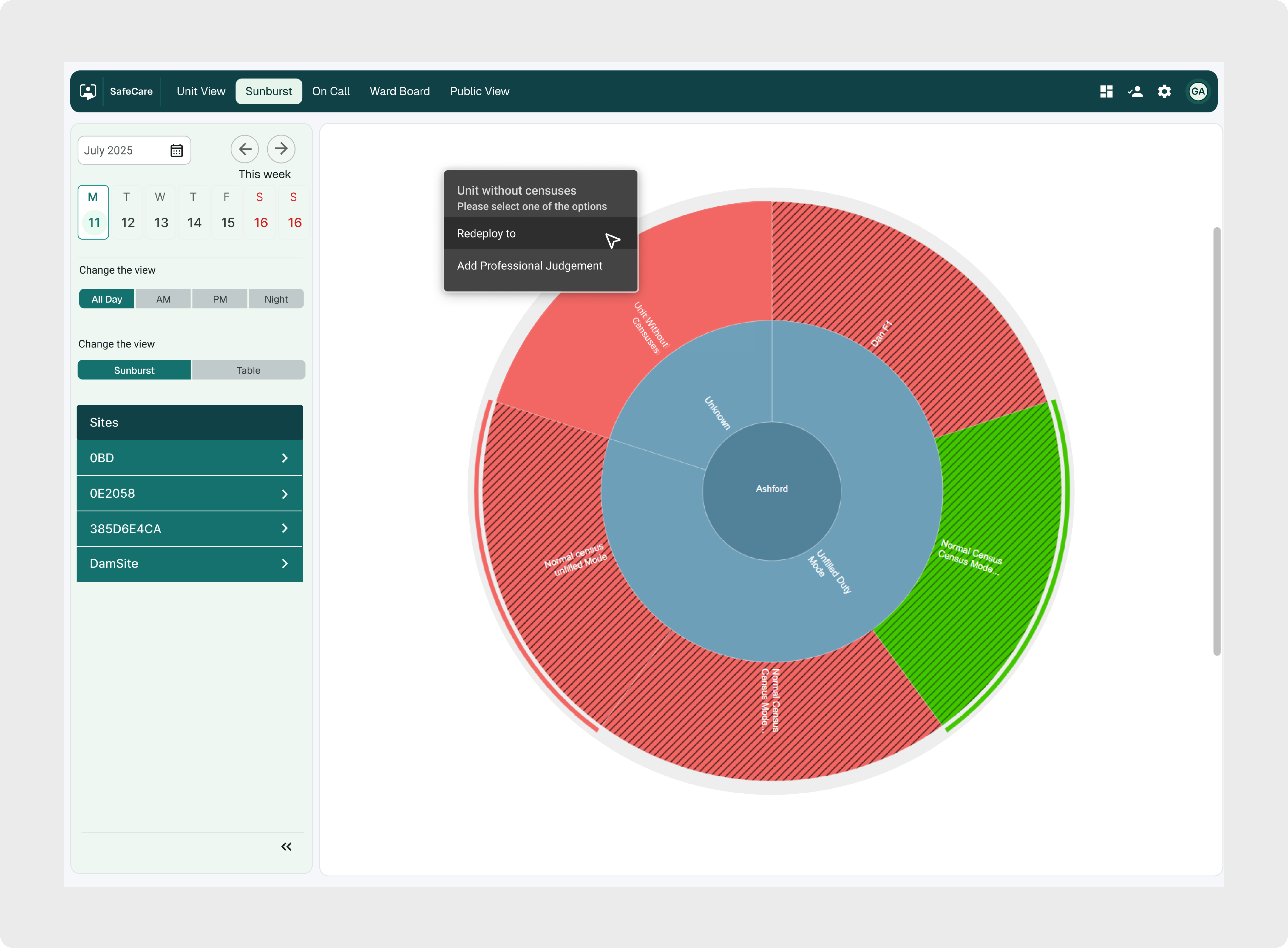
One of them was the new Sunburst view. We wanted to give staffing teams a faster way to understand the staffing situation across different levels of the organisation, without having to open and check each area separately. We explored different ways of presenting this information and decided on a visual hierarchy that lets users move from the bigger picture into individual areas and quickly see where attention is needed.
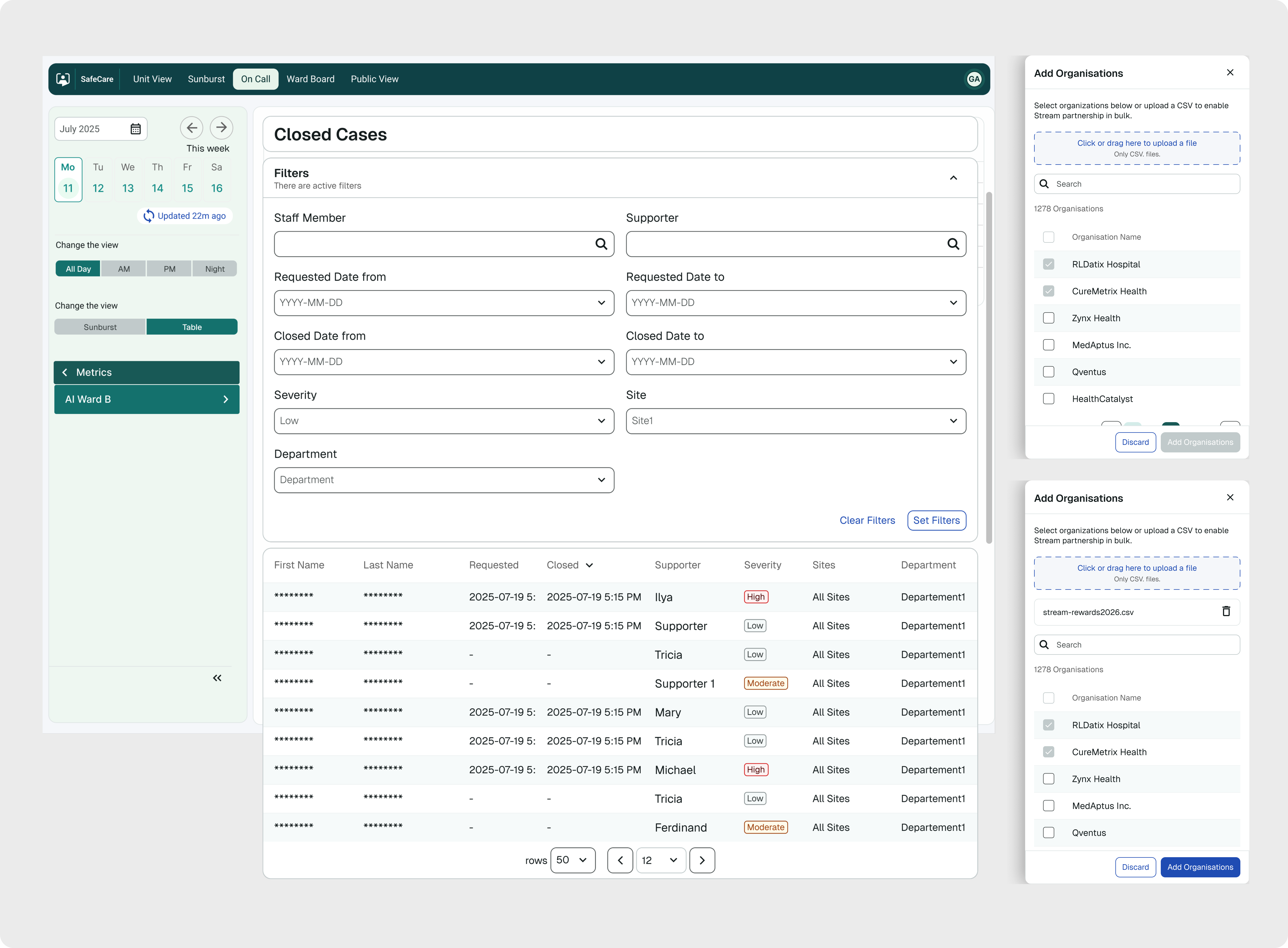
Other new features addressed a different challenge: users needed to work with larger amounts of information while still being able to quickly find and act on what mattered. We focused on making the information easier to scan, giving users better ways to filter and narrow it down, and keeping important actions close to the data they were working with.
Mobile screens
Once the desktop experience was validated and established, we started designing the mobile version. Instead of simply scaling down the desktop interface, we looked at how healthcare teams would actually use SafeCare on smaller screens.
Through research and user feedback, we identified which information and actions were most important in their daily work and prioritized those for mobile. This helped us simplify the experience and focus on what users needed to access quickly while working across different hospital environments.
Accessibility was also an important part of the process. SafeCare is used by healthcare professionals across different age groups, so we focused on clear information hierarchy, readable content, visible actions, and interactions that were easy to understand and use on smaller touch screens.


Key Takeaways
SafeCare became more than a visual redesign. We improved existing workflows, introduced completely new features, and created a more consistent experience across desktop, tablet and mobile. One of the biggest improvements was creating reusable patterns and components that could work across different parts of the product. This helped us keep the experience consistent while also making it easier to design and build new functionality as the product continued to grow.
Working closely with users throughout the project helped us validate important decisions and make sure we were solving real problems rather than simply modernising the interface.
For me, the biggest takeaway was finding the right balance between familiarity and change - improving a product that people already relied on every day, while introducing new ways of working without making the experience feel unfamiliar.